One of our all time favourites, the WordPress Plugin WP Featherlight. It enlarges single and gallery images when clicked in a modal window. jQuery is required with an added bonus of WordPress showing the image if JavaScript is not available.
How to link Media Files using WP Featherlight
-
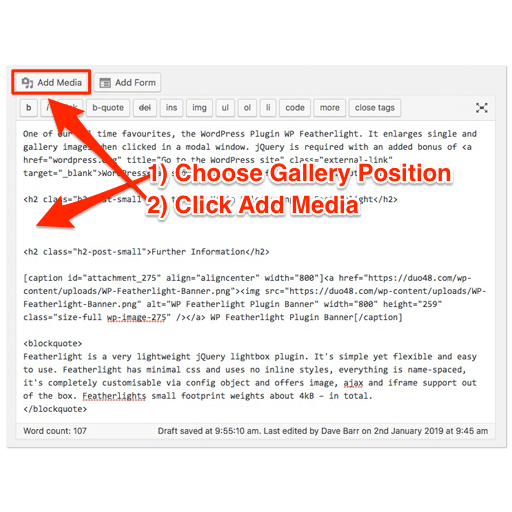
Figure 01 -
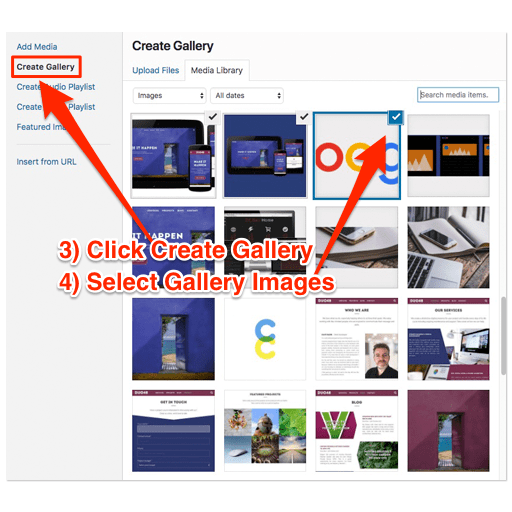
Figure 02 -
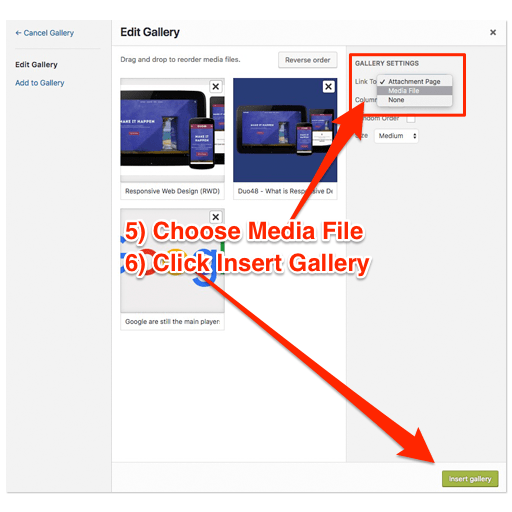
Figure 03
- Place the cursor at the position within the page you would like the gallery to appear.
- Click the “Add Media” button.
- Click “Create Gallery” – do this now before you forget.
- Select all the images from the Media Library you want to display in your gallery.
- Important: Choose “Media File” from the “Link To” dropdown menu.
- Click “Insert Gallery”. That’s it!
For an example click any of the images in the gallery above.
Further Information
WP Featherlight is a WordPress lightbox plugin for adding a minimal, high-performance, responsive jQuery lightbox to your WordPress website. At its core, WP Featherlight is a WordPress plugin wrapper for the Featherlight jQuery lightbox plugin. When installed, the plugin will automatically display all standard WordPress images and galleries in a simple, minimalistic lightbox popup.

It’s simple yet flexible and easy to use. Featherlight has minimal CSS and uses no inline styles, everything is name-spaced, it’s completely customisable via config object and offers image, Ajax and iframe support out of the box. Featherlight’s small footprint weights about 4kB – in total.
In Conclusion
This is a clean, fast and simple solution for showing WordPress Galleries in a jQuery modal. We have been using it for over 3 years now and never experienced an issue, bug or problem.
Further Reading
- Download Plugin (wordpress.org)
- Usage & Configuration (github.com)
- jQuery Homepage (jquery.com)
- Developers (cipherdevelopment.com)


